
Ejari is the official platform that registers tenancy contracts in Dubai. It is managed by RERA under the Dubai Land Department. The system keeps a record of all rental contracts in the city. It helps protect the rights of both tenants and landlords and reduces rental disputes.
Cancelling Ejari is an important step before shifting to a new home or before a landlord rents to a new tenant. Each property can have only one active Ejari at a time. If the old Ejari stays active, it can block new registrations and cause problems with future rentals.
The following is a detailed guide on how to cancel Ejari in Dubai. You will learn about the cancellation process, documents required, and other important aspects.
Key Takeaways
- Ejari cancellation is necessary when a tenancy ends, ownership changes, or a tenant moves to a new property.
- Landlords usually handle the cancellation, but tenants can participate with the landlord’s agreement.
- Required documents include Emirates IDs, NOC, Ejari certificate, DEWA bill, and tenancy contract.
- Ejari can be cancelled online via the DLD website or Dubai REST app, or offline at a Trustee Centre.
- Always settle bills, keep copies of documents, and confirm lease termination to avoid delays or issues.
When Should You Cancel Your Ejari
The first question is why or when you should cancel Ejari in Dubai. Ejari cancellation becomes necessary in a few common situations. It is needed when a tenancy ends and the contract is not renewed. It also applies after early termination as agreed by both the tenant and landlord. The process is required when moving to another property or leaving Dubai. A change in property ownership also requires Ejari cancellation.
Who Can Cancel Ejari
Landlords usually handle Ejari cancellation. Tenants can take part or begin the process if both sides agree. Some steps, such as getting a No Objection Certificate (NOC), need the landlord’s direct approval.
Documents Needed for Ejari Cancellation
The following documents are required during the Ejari cancellation process:
- Emirates ID of the tenant and landlord
- No Objection Certificate (NOC) from the landlord
- Ejari certificate or tenancy contract, if the certificate is missing
- Tenant’s passport copy or company documents for corporate leases
- Original unified tenancy contract
- Last paid DEWA (Dubai Electricity and Water Authority) bill
- Termination letter from the landlord, including company details if needed
Information to Include in the NOC Letter
The NOC must include the landlord’s name and signature, matching the passport. It should also mention the building name, plot number, and DEWA premise number. Tenant information must be clear. The letter must confirm that the property is vacant. If the owner is a company, the document should include the official company seal.
Additional Documents for Ejari Cancellation
In some cases, extra documents are needed. If the property was sold during the lease, the title deed must be submitted. The new owner should also provide a copy of their Emirates ID or passport if they are not a UAE resident.
If a representative signed the tenancy contract for the landlord, the Power of Attorney must be included. This document should confirm that the representative has the right to sign on the owner’s behalf. The representative must also provide their Emirates ID, residency visa, or passport.
How to Cancel Ejari in Dubai: Ejari Cancellation Procedures
You can cancel an Ejari registration either online or at a Trustee Centre. The steps for each option are listed below.
How to cancel Ejari Offline?
Those who want in-person help can visit an authorized centre. The process usually finishes within a few hours after submitting the documents.
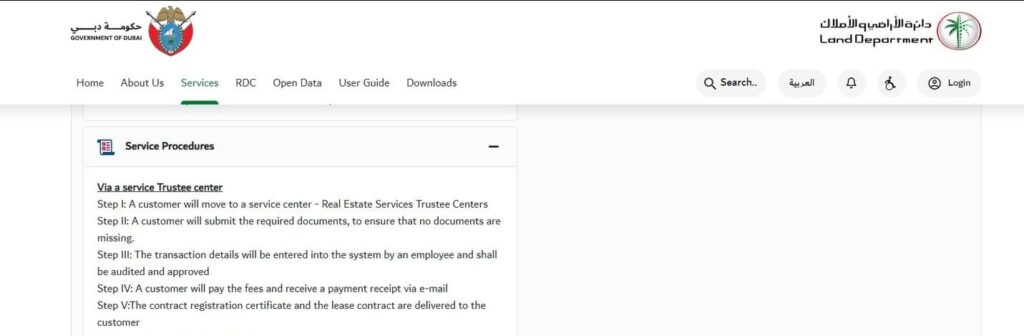
- Visit any of the Real Estate Services Trustee Centres or Ejari Cancellation Centre.
- Submit all the required documents.
- Pay the Ejari cancellation fee. Check the current amount in advance.
- Wait for document verification, which usually takes about four business hours.
- Collect the Ejari Cancellation Certificate once the process is complete.
How to Cancel Ejari Online?
There are two main methods to cancel Ejari in Dubai—DLD website or the Dubai REST app.
How to Cancel Ejari Through the DLD Website?
You can cancel an Ejari contract using the Dubai Land Department website.
- Go to the Ejari cancellation page on the DLD website.
- Open the Services tab.
- Choose Tenant from the drop-down list.
- Select Real Estate Rental Services.
- Click Request for Cancellation of Ejari Contract.
- Press Access this Service on the top left (green tab).
- Log in using your DLD account as an owner, tenant, individual, or business user.
- Business users should enter their Emirates ID or username and password.
Owners, tenants, and individuals should provide their Emirates ID, mobile number, title deed, or email address.
You can also log in using UAE Pass. Enter your Emirates ID, mobile number, or email address and follow the steps to complete the process.
How to Cancel Ejari on Dubai REST App?
You can also cancel Ejari through the Dubai REST app.
- Sign up or log in to the Dubai REST app.
- Fill in the required information.
- Attach all necessary documents.
- Submit your cancellation request.
- Wait for the review. You will receive an email once your request gets approved.
What is Ejari Dubai Cancellation Cost?
Cancelling Ejari through the mobile app does not cost anything. The fee at Real Estate Services Trustee Centres is AED 40, excluding VAT.
RERA may reject a cancellation request if the property faces a dispute or other issues. In such situations, visit an Ejari centre and fix the issue before continuing with the cancellation.
Ejari Cancellation Processing Time
Understanding the usual processing time helps in planning a move or lease transfer.
- Offline requests usually take about four working hours at the centre.
- Online requests may take longer because of digital verification.
Always check your email or SMS for confirmation once the cancellation is complete.
Important Tips and Common Issues in Ejari Cancellation
Careful planning helps make the Ejari cancellation process quick and simple. Here are a few tips to follow:
- Always clear all DEWA and utility bills before starting the cancellation to prevent rejection.
- Both the tenant and landlord should agree on ending the lease.
- Keep copies of every document, receipt, and the Ejari Cancellation Certificate for your records.
- If you are unsure about the process, consider using a professional service to handle the paperwork and avoid delays.
- Review your Dubai tenancy contract carefully to check for any penalties related to early termination.
Dubai Ejari Cancellation FAQs
What can I do if the landlord refuses to provide an NOC?
Ejari cancellation requires the landlord’s approval. You can seek help through RERA or the Dubai Land Department for mediation or legal advice.
What happens if I do not cancel Ejari after my tenancy ends?
Failing to cancel Ejari can prevent registering a new contract for the same property. This may delay new tenancies or relocation plans.
Can I cancel Ejari online, or do I need to visit a centre?
You can cancel Ejari online using the DLD website or the Dubai REST app. Offline cancellation is also available at Real Estate Trustee Centres.
How do I download the Ejari certificate?
Visit the official Dubai Land Department website and enter your phone number. Provide your DEWA Premise Number or Municipality Number, and then select Download PDF to receive your certificate.
Can someone else cancel Ejari on my behalf?
The landlord can assign a trusted person, such as a family member, friend, or agent, to complete the cancellation.
How to cancel Ejari as tenant?
Tenants must first get the landlord’s agreement to end the lease. The landlord can then cancel the contract online through the Ejari platform. Tenants can also follow the platform’s steps to cancel the contract themselves if allowed.